
OnePlus 3 and OnePlus 3T both devices are getting OxygenOS 4.0.3 update from OnePlus. The OxygenOS 4.0.3 for OnePlus 3/3T is rolling out via OTA so if you are running the previous OxygenOS 4.0.2 update then you are eligible to receive the OTA notification anytime soon. If you think still your device is not getting the update then just grab the OxygenOS 4.0.3 OTA firmware from the link below and install it on your device manually without waiting for the OTA.
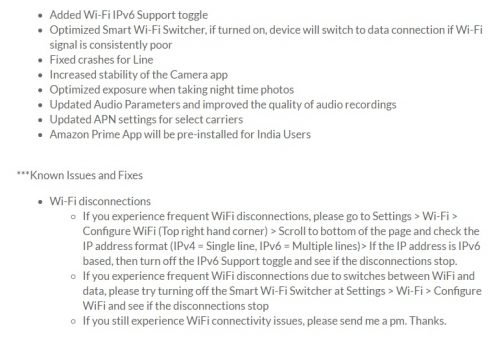
The OxygenOS 4.0.3 update brings multiple improvements inside it, some of the main improvements are added WiFi IPV6 support toggle, improvements in WiFi connection and camera improvements for more just watch the change log of OxygenOS 4.0.3. Go to Settings menu > About device and perform a software update check. If you receive the OTA notification then download and install it on your device else you can follow the guide mentioned below to update OxygenOS 4.0.3 on OnePlus 3/3T via adb sideload.
OxygenOS 4.0.3 changelog:
How to install OxygenOS 4.0.3 OTA on OnePlus 3/3T
Download OxygenOS 4.0.3 OTA for OnePlus 3
Download OxygenOS 4.0.3 OTA for OnePlus 3T
Flash OxygenOS 4.0.3 OTA via ADB-Sideload
Set up adb-fastboot drivers on PC by following this guide.
Download the OxygenOS 4.0.3 OTA for OnePlus 3/3T and transfer the downloaded zip file in a specific folder.
Now open the same folder press Shift+Right Click on any empty area in the folder then choose ‘Open command window here’.
Issue the following command to reboot your device into recovery mode
adb reboot recovery
Once in recovery mode, select ‘Install from USB’ and then type the following command to start the adb sideload process.
adb sideload ota.zip
The installation process will start and wait for it to complete. Once the process is completed simply type
fastboot reboot
That’s it! You have now latest Nougat OxygenOS 4.0.3 installed on your OnePlus 3/3T.
Source: OnePlus