

Motorola has begun rolling out the stable Android 16 update for the Motorola Edge 60 Stylus, making it the first Motorola device to receive this major OS upgrade. The rollout is now live at the time we are writing this article and may take a few weeks to reach all users globally.
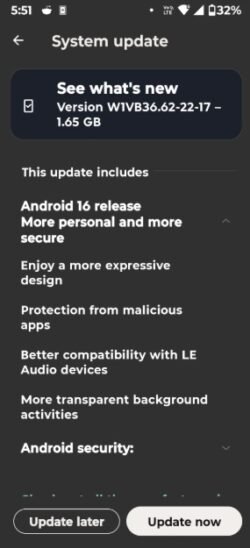
A Reddit user has confirmed receiving the update in India, suggesting that the rollout is now live in at least one region, with other markets likely to follow soon. According to the shared screenshot, the update carries the build number W1VB36.62-22-17 and has a download size of approximately 1.65GB, so users are advised to install it over a Wi-Fi connection.
In addition to Android 16, Motorola has also confirmed that the Edge 60 Stylus will be eligible for Android 17, ensuring at least one more major OS update for the device.
Android 16 firmware details:
Device Name: Motorola Edge 60 Stylus
Update size: 3.1GB
OS update: Android 16
Build number: W1VB36.62-22-17
Android Security Patch Level: December 2025
If you wish to update your device without waiting for the OTA just follow the steps below. (un-rooted only)
Download W1VB36.62-22-17 firmware Android 16 update for Motorola Edge 60 Stylus
Perform these below steps to catch the OTA.
Step 1: Open the Settings app from the app drawer.
Step 2: Scroll down and tap on About phone.
Step 3: Select System updates to check for available software updates.
Step 4: If the Android 16 update is available, tap Download.
Step 5: Once the download is complete, follow the on-screen instructions to install the update automatically. Make sure your device has sufficient battery charge and is connected to Wi-Fi.
Note: If you get OTA update right on your device, then before installing the update it is mandatory to charge your device minimum at 70% to avoid shut down. Good Luck 🙂